Opbox runs a professional-services practice (a law firm, an immigration practice, a corporate-services shop) as a single system: one Rust kernel of verbs, one Postgres of record, and the agent as the interface. This overview walks the whole stack in plain terms, then points you to the detail.
The stack, in one minute
Opbox is built from four layers, each with one clear job:
- The screens (front end). A web app where your staff and clients do their work: open a matter, edit a document, fill in a form, sign something. There is also a chat box and a command line. These are just ways in; they hold no rules of their own.
- The agent (AI). A bounded AI assistant that can do real work for you. It is kept “caged”: it can only act through the same front door everyone else uses, and it cannot reach the internet or run loose code.
- The kernel (the core). One Rust program that is the single front door to everything. Every
action, by a human, the command line, or the AI, is a named verb (
matter.create,bill.charge,file.put). The kernel checks who you are, checks you are allowed, does the work, and writes a permanent record of it. Nothing reaches the data except through a verb. - The database (Postgres). The single source of truth. Every matter, document, party, bill, and file lives here, fenced so one client’s data can never be seen by another, with files encrypted and an audit log that cannot be quietly altered.
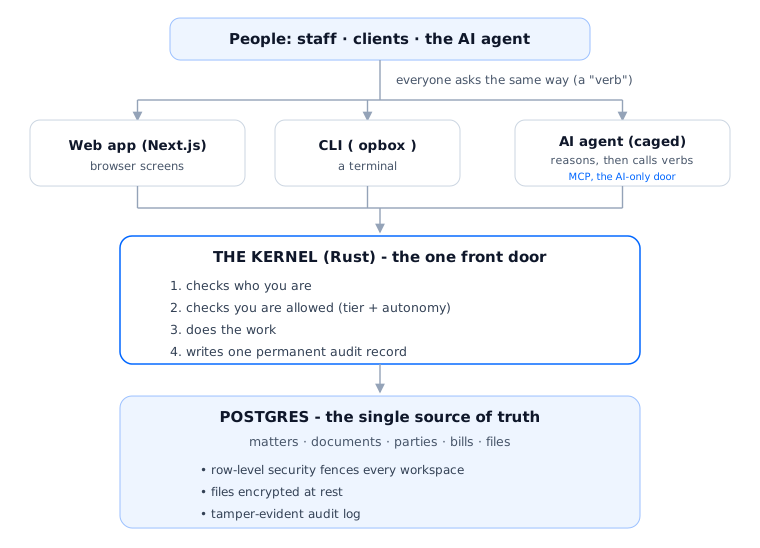
How a request flows, end to end
Say a lawyer clicks “Advance this matter to the next step.”
- The web app sends one verb to the kernel:
matter.advance(matter, step). It sends no business logic, just the request. - The kernel asks, in order: Who is this? Are they a member of this workspace? Are they allowed to advance a matter? (If it were the AI: is it within its autonomy and budget?)
- If every check passes, the kernel does the work in the database: the current step closes, the next one opens, any required approval (a “gate”) is created.
- The kernel writes one audit record: who did what, to which matter, at what time.
- The screen refreshes to show the new step.
If the AI agent had done this instead of the lawyer, it would have travelled through the exact same kernel and the exact same checks, just arriving through the AI-only door (MCP). The AI can never do something a verb would not let a person do.
The four layers up close
The kernel
One Rust program, ~360 verbs across four tiers (about 68 always-on Core, the rest unlocked on demand or admin-only), the trust boundary. Every screen, command, and AI action goes through it. How the kernel works →
Postgres + the data model
The single source of truth. Matter, document, party, bill, form, file are solved, built-in primitives. The data model →
The caged agent
A bounded AI that calls the same verbs you would, over MCP: capability-stripped and egress-locked. Agents & MCP →
Security & permissions
Workspace isolation, tiers, encryption at rest, and a tamper-evident audit log - the kernel checks every call before it runs. Security →
The ideas that hold it together
- Consolidation over fragmentation - fold a new need into what exists; never spin up a second system. One database, one kernel of verbs.
- One source of truth per fact - everything else (a screen, a report, a chat card) is a regenerable view of it.
- The agent is the interface - default to chat; build a screen only for what genuinely needs one.
- Capabilities are verbs behind one front door - the human, the command line, and the AI all call the same verbs.
- Own what differentiates, rent the rest - Opbox owns the substrate and the product face; it rents the database, the web server, and the raw reasoning engine.
- A vertical is configuration, not a paywall - the substrate provides every primitive; a “visa practice” or “corporate-services practice” is config on top, not a locked tier.
Where to go next
- Architecture - the layers in depth and the request lifecycle.
- The kernel - verbs, the one front door, and how a call is checked.
- The data model - matters, steps, documents, parties, bills, and how they relate.
- Security & permissions - who can see and do what, and why it holds.
- Files & storage - where documents live and the rules that protect them.
- Capabilities - the verbs, grouped by what they let you do.